
Claude can read a webpage. It can run a script. It can browse a repository. What it cannot do, out of the box, is watch a video. You paste a YouTube link and it has to either guess from the title or pull a transcript that is missing 90% of what is on screen.
claude-video fixes that. It is a Claude Code plugin that gives Claude the ability to watch any video: YouTube, Loom, TikTok, X, Instagram, local files, and a few hundred more platforms. You paste a URL, ask a question, and Claude answers grounded in what it actually saw and heard.
But the interesting part is not what it does. It is how it does it. The architecture is a clean example of a pattern I think we will see a lot more of: decomposing a medium an LLM cannot natively process into components it can, then handing those components to the model as structured context.
The problem: LLMs cannot watch video
LLMs are text-native. The frontier models (Claude, GPT-4o, Gemini) can accept images as input, but video is a different beast. A 10-minute video at 30 fps is 18,000 frames. Even if you could stuff that many images into a context window, the token cost would be astronomical and the model would drown in redundant information.
The standard workaround is to pull a transcript and call it a day. But transcripts miss everything visual: UI bugs in screen recordings, visual hooks in ad creative, charts in presentation videos, code on screen in tutorial recordings. You get the words but not the picture.
claude-video solves this with a two-stream decomposition: frames for the visual, transcript for the audio. Each stream is optimized independently, then both are handed to Claude as structured context.
The decomposition pipeline
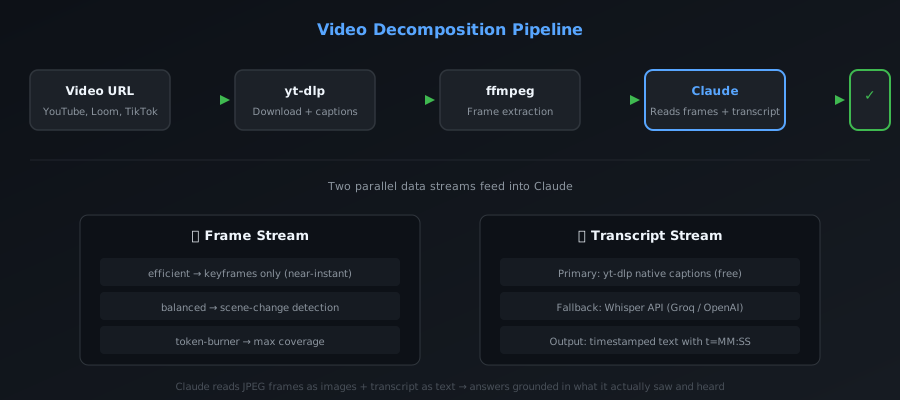
The pipeline has five stages:
1. yt-dlp handles the download. It checks for captions first. At transcript detail, captioned URLs return without downloading video at all. When frames are needed, it downloads only what the run requires. No wasted bandwidth.
2. ffmpeg extracts frames at the chosen detail level. Three modes, each a different tradeoff between speed and coverage:
efficientdecodes keyframes only. Near-instant, good enough for most use cases.balancedandtoken-burneruse scene-change detection with a duration-aware uniform sampler as fallback. More frames, more context, higher token cost.
JPEGs are 512px wide by default and clamped to 1998px tall for Claude Read compatibility. Every frame carries a t=MM:SS marker so Claude knows exactly when in the video it occurred.
3. The transcript comes from one of two places. First try: yt-dlp pulls native captions (manual or auto-generated) from the source. Free, instant, reasonably accurate. Fallback: extract a mono 16 kHz 64 kbps mp3 audio clip (~480 kB/min) and ship it to Whisper. Groq's whisper-large-v3 is preferred (cheaper and faster), with OpenAI's whisper-1 as backup.
4. Frames and transcript are handed to Claude. The script prints frame paths with timestamps and the transcript with timestamps. Claude Reads each frame in parallel. JPEGs render directly as images in its context. The transcript provides the audio track.
5. Claude answers grounded in what is actually on screen and in the audio. Not "based on the description" or "according to the title." It saw the frames. It heard the transcript. It answers the way someone who watched the video would.
The frame budget: why it matters
Token cost is dominated by frames. Every frame is an image; image tokens add up fast. The script's auto-fps logic exists so you do not blow your context budget on a sparse scan of a 30-minute video that would have been better answered by a focused 30-second clip.
The key insight: you do not need every frame. You need the right frames. Scene-change detection finds the moments where something actually changes on screen. Keyframe extraction gives you the I-frames that contain complete picture information. The uniform sampler fills gaps when the scene detector under-produces.
This is the same principle behind RAG for text: do not stuff the entire corpus into the context window. Find the relevant chunks and feed those in.
What people actually use it for
The use cases are more practical than you might expect:
Bug diagnosis from screen recordings. Someone sends you a screen recording of something broken. /watch bug-repro.mov what is going wrong? Claude watches the recording, finds the frame where the issue appears, describes what is on screen, and often catches the cause without you ever opening the file.
Content analysis. /watch https://youtu.be/viral-video what hook did they open with? Claude looks at the first frames, reads the opening transcript, breaks down the structure. Same for ad creative, competitor launches, podcast intros.
Video summarization. /watch https://youtu.be/long-thing summarize this pulls the structure, the key moments, what was actually said and shown. Faster than watching at 2x.
Turning playlists into notes. Run /watch across a series and file a per-video summary. A channel or course becomes a searchable set of notes instead of hours you have to sit through.
The multi-provider distribution strategy
One underappreciated aspect of claude-video is how it ships. It is not just a Claude Code plugin. It is available as a skill/plugin for 13+ coding agents: Cursor, GitHub Copilot, Gemini CLI, Codex CLI, Grok Build, OpenCode, Pi, Kiro, Trae, Rovo Dev, Qoder, and Mistral Vibe.
This is a smart distribution strategy. The core logic (yt-dlp + ffmpeg + frame extraction + transcript fetching) is agent-agnostic. The agent-specific part is just a thin wrapper that tells each agent how to invoke the tool. By targeting the skill/plugin ecosystem rather than any single platform, the project maximizes its reach without multiplying its maintenance burden.
It also future-proofs the tool. If one coding agent fades and another rises, the core pipeline does not need to change. Just add a new wrapper.
The broader pattern
claude-video is one instance of a pattern I think we will see a lot more of: decomposition-based multimodal tooling for AI agents.
The pattern is:
- Identify a medium the LLM cannot natively process (video, audio, 3D models, large datasets, binary formats).
- Decompose it into components the LLM can process (images, text, structured JSON).
- Optimize each component stream independently (frame budget for video, chunk size for audio, sampling strategy for data).
- Hand the structured output to the LLM as context.
- Let the LLM reason across the streams.
This is more powerful than it sounds. It means any medium can become LLM-accessible with the right decomposition strategy. Video becomes frames + transcript. Audio becomes spectrograms + transcription. 3D models become multi-view renders + metadata. Large datasets become statistical summaries + sampled rows.
The hard part is not the decomposition itself. It is the optimization: knowing which frames matter, how much context is enough, when to fall back to a cheaper path. claude-video gets this right with its three detail levels and its captions-first-then-Whisper transcript strategy.
What is next
The project is actively developed with 60+ open PRs and frequent releases. The roadmap includes better frame selection heuristics, support for more video platforms, and tighter integration with agent workflows.
If you use Claude Code (or any of the supported agents), install it and try /watch on a video you have been meaning to analyze. The zero-config setup means it just works: yt-dlp and ffmpeg install on first run via brew on macOS, and Linux/Windows get exact commands printed.
The decomposition pattern is worth studying even if you never use the tool itself. As AI agents become more capable, the bottleneck shifts from "can the model reason about this" to "can we get the right information into the model's context." Tools like claude-video are the answer to that second question.
claude-video on GitHub, 11k+ stars, Apache 2.0 licensed